AR glasses for sim racing and flight sims: can they beat a headset?
AR glasses give sim racers a big, sharp virtual monitor, but not a cockpit. Here's what they do well, where a VR headset wins and the pairs worth trying.
No, AR glasses don't beat a VR headset for sim racing or flight sims. A headset puts you inside the cockpit, with depth and full head tracking. Glasses give you a flat virtual monitor about half as wide. But as a monitor, they're good. They fit a small room, work with a PS5 or Xbox, and the ROG XREAL R1 runs at 240Hz. That makes the R1 our pick.
Note
We haven't raced in these ourselves yet. This page comes from the makers' specs and manuals, the sim developers' VR pages and community projects on GitHub, all checked November 12, 2026. Community tools change fast, so check their pages before you install anything.
What AR glasses are in a sim
Think of AR glasses as a big monitor you wear. Your PC or console sends one flat picture, and the glasses show it floating in front of you. Your sim doesn't know it's not a regular screen.
That screen is narrower than you might expect. Makers quote a diagonal field of view, so we worked out how wide each view is from side to side:
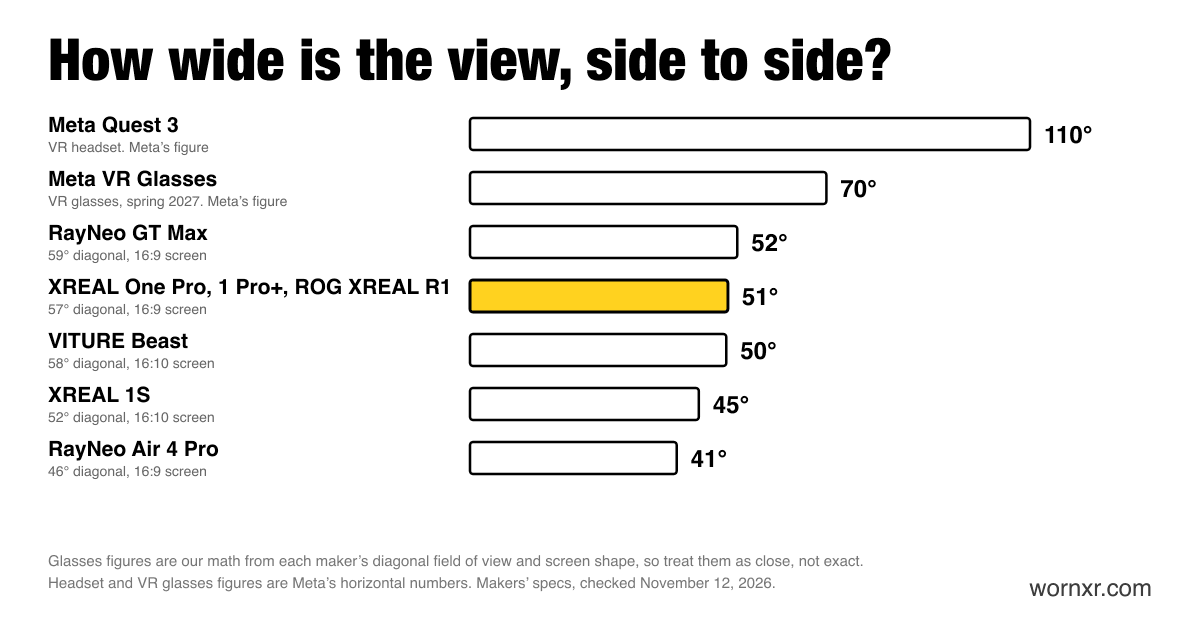
Most glasses land between 41° and 52° across. A Meta Quest 3 is 110°, by Meta's own numbers. So in a car, glasses show you the windshield. A headset also shows you the A-pillars, the mirrors and the apex out of the side window.
Where glasses win
- Small spaces. No monitor mount, no triple screens. Your rig can live in a corner.
- Consoles. Gran Turismo 7 on a PS5 and Forza on an Xbox run as a big flat screen. You need an HDMI adapter or a dock. Here's how to hook up a PS5 or Xbox.
- Refresh rate. The ROG XREAL R1 can run at 240Hz on a PC that keeps up. Most glasses top out at 120Hz.
- A wider monitor on a PC. XREAL's UltraWide mode makes a 21:9 or 32:9 screen, a decent stand-in for triple monitors. It needs your glasses set up as an extended display on a computer, not a console.
Where a headset wins
- Depth. A headset shows each eye its own image, so the cockpit has real 3D depth. Braking points are easier to judge.
- Scale. The car is life-size around you, not a picture in front of you.
- Head tracking. You turn your head to look into a corner, and the game follows. iRacing pitches VR as putting you "in the driver's seat."
If those three are why you want to sim race, skip glasses and buy a headset. We cover the options below.
The head tracking catch
Glasses that pin the screen in place, like the R1, track your head. But that tracking moves the screen, not your view inside the game. No setup we found does both at once.
Community developers have built bridges. G0retZ's free tracker-xr-glasses plugin sends head movement from the glasses to OpenTrack on Windows, so the game camera turns with you. It's verified on the VITURE Pro 2. A separate community add-on does the same for the XREAL One, and it tells you to use Follow mode. That means the screen moves with your head while the game view turns too. Expect some trial and error. These are hobby projects, not features from XREAL or VITURE.
Experimental: real 3D in VR games
A free community tool called VRto3D makes SteamVR games think a headset is connected. It then sends a side-by-side 3D picture to your glasses, which show one half to each eye. Its guide says to switch your glasses to their full side-by-side 3D mode first. One user has posted a guide to running Microsoft Flight Simulator 2024 this way on a VITURE Beast.
It's clever, but keep your hopes in check. You get depth, not a wider view. The picture is still about 50° across, and there are no motion controllers. Think of it as a weekend project.
What about lag?
No glasses maker publishes how long a frame takes to get from your PC to your eyes. XREAL lists "M2P Latency 3 ms," which is how fast the pinned screen reacts when you turn your head. The R1 lists a 0.01 ms response time for its screens. Neither is input lag. We found no independent measurement either, so we can't say how glasses compare with a gaming monitor here.
Which sims support VR?
If you're weighing a headset instead, here's where the big sims stand. On glasses, every one of these runs as a regular flat screen.
| Sim | VR support |
|---|---|
| iRacing | Yes, through OpenXR, OpenVR or Oculus. Lists Quest 3, Valve Index, Bigscreen Beyond 2e, Pimax and more, with Steam Frame "coming soon" |
| Assetto Corsa Competizione | Yes, through SteamVR or Oculus on PC |
| Assetto Corsa EVO | Yes, overhauled in update 0.8 in July 2026 |
| Le Mans Ultimate | Yes, on PC |
| Gran Turismo 7 | Yes, with PS VR2 on a PS5 |
| Microsoft Flight Simulator 2024 | Yes, on PC through OpenXR. Not on Xbox |
| DCS World | Yes, on PC |
| X-Plane 12 | Yes, with a rebuilt VR mode in version 12.4.3 from June 2026 |
Our picks
Best for sim racing: ROG XREAL R1
The R1 was built for gaming with ASUS's ROG team. Turn on Frame Rate Boost and it runs at up to 240Hz. Double-click the Menu Button, then go to Gaming, then Frame Rate Boost. XREAL warns it "may result in a slight reduction in text clarity," which matters more for spreadsheets than for racing lines.
Its dock is the other reason. It has a DisplayPort 1.4 input and two HDMI 2.0 inputs, so a PC and a console can stay plugged in and you switch between them. ASUS also suggests pulling the screen closer for racing games. It costs $849.
Skip it if you mostly fly. Flight sims don't need 240Hz, and the R1's screens are 1080p, so small cockpit gauges get tight. Here's how it compares with the 1 Pro+.
Compatibility checkerPlayStation 5 + ROG XREAL R1Not verifiedBest for a wide PC setup: XREAL 1 Pro+
The $599 1 Pro+ shares the R1's 57° view and adds brightness, at up to 1,200 nits against the R1's 700. On a PC, its UltraWide mode gives you a 32:9 screen, and it runs at up to 120Hz. That's the closest glasses get to a triple-monitor feel.
Skip it if you want 240Hz. Our PC picks cover the rest of what it can do on Windows.
Widest view: VITURE Beast
The $549 Beast has a 58° diagonal view with 1920×1200 screens, taller than the 1080p on XREAL's pairs. VITURE adds a 32:9 UltraWide mode on Mac and Windows. It's also the pair in the community flight sim guide above.
Skip it if you play on a console and want UltraWide. It only works on computers. Here's how the Beast stacks up for gaming.
Coming in spring 2027: Meta VR Glasses
Meta VR Glasses sit between glasses and a headset. Meta lists a 70° by 66° view at 120Hz, and PC VR through "Meta Quest Link (cable or Air Link)." That should mean real VR sims, with depth. They cost $1,299.99. Meta hasn't said anything about wheels or sim racing yet, so wait for reviews. Here's how they compare with the Steam Frame.
Get a headset instead if...
- You want the full cockpit on a budget. The Meta Quest 3 has a 110° view and works with iRacing.
- You want wireless PC VR. Valve's Steam Frame starts at $1,059.
- You race with a wheel and want the lightest headset. The Bigscreen Beyond 2e starts at $1,099, plus base stations if you don't have them.
Our Beyond 2e vs Dream Air vs Steam Frame comparison shows what each one really costs.
More help
- Best AR glasses for gaming
- Best AR glasses for a PC
- How to get an ultrawide screen on Windows
- XREAL 1 Pro+ vs ROG XREAL R1
- Meta VR Glasses for PC VR and sim racing, due in spring 2027
- The lightest AR glasses and VR headsets
New to AR glasses? Start here for the five things to do first.
How we picked
We ranked pairs by what matters on a sim rig: refresh rate, view width and how they connect to a PC or console. Specs and prices come from each maker, checked November 12, 2026. The view widths in our chart are our math from each maker's diagonal figure, so treat them as close, not exact. We haven't raced in these pairs ourselves yet. Here's how we research and test.