Raven Prism 1 runs Linux, but its app framework isn't open source
You can SSH in and run any ARM64 program. But Raven's license calls its framework source available, not open source. Here's what developers actually get.
The big hook of the Raven Prism 1 is that it's a Linux computer you wear. As far as Raven's docs go, that part holds up. You can SSH in and run your own software. Raven's line is "if it runs on ARM64, it runs here."
"Open" is where it gets fuzzy. The description Raven gives search engines for its developer page calls it "the open-source Raven Framework." You won't see that phrase on the page itself. And the license in the framework's GitHub repo says something else: "source available, not open source."
Note
We haven't tried a Raven Prism. This post uses Raven's site and GitHub repos as they stood on November 6, 2026, plus reports from other outlets. Either line could change, and we'll update this post if it does.
What Linux gets you
Here's what Raven's developer page and SDK docs list:
- A shell. SSH in from your own machine.
- Your own stack. Any ARM64 Linux program or runtime. The docs name Go, Rust, Node and C/C++. The developer page also lists "Full chroot access."
- Graphics. A Wayland compositor with OpenGL ES 2.0. The docs are clear that there's no Vulkan and no OpenGL ES 3.x.
- Every sensor. Camera, microphones, motion sensor, eye control and speakers, down to writing pixels to the framebuffer.
- A Python framework. It has buttons, scroll views and other parts built for eye control, plus a desktop simulator.
You can try that last one today with no glasses at all. The framework is on GitHub at alpha 1.0.7, and it needs Python 3.10 or newer. It's FOSS also reports that the glasses can be rooted.
What the license actually says
You may install and run the unmodified framework, including the simulator. You can build, test and run your own apps on its public APIs. Those apps are yours.
You may not, without written permission, modify the framework, redistribute it, sublicense it or make derivative works. Contributions are welcome, but you have to sign a contributor agreement first.
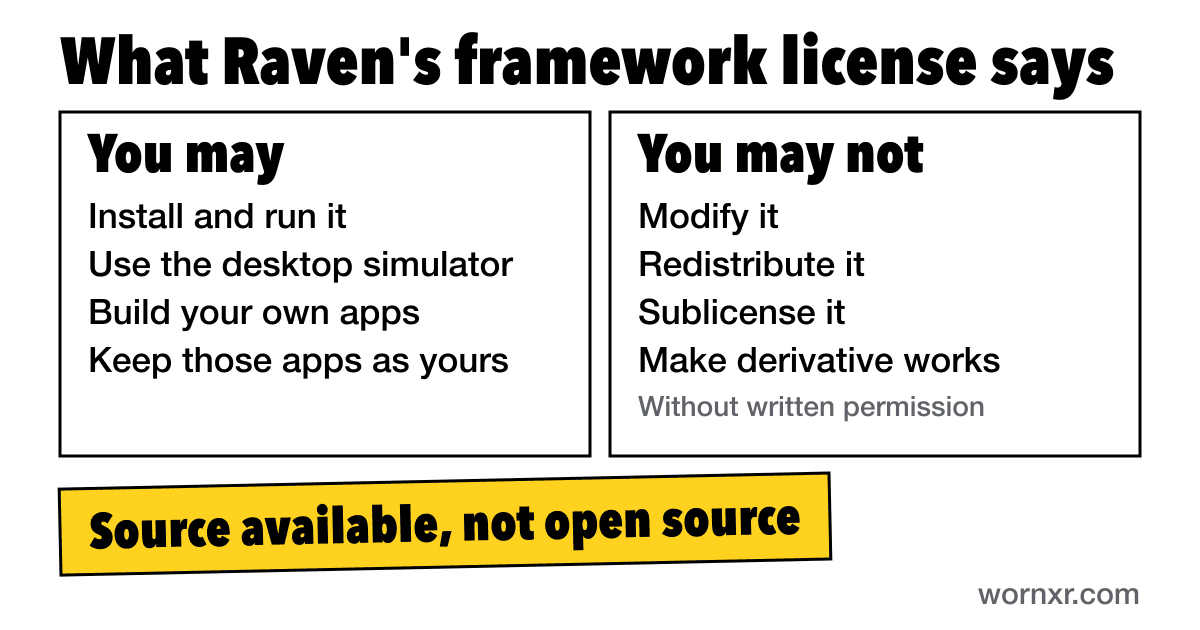
So you can read the code, but you can't fork it and ship your own version. Plenty of companies make that choice. It's just not what "open source" usually means. It's FOSS flagged this back in June, saying the project isn't open source even though the operating system is based on Linux.
You don't have to use the framework, since you can bring your own stack. But the docs say sensor access will need a special entitlement when you publish apps in the future. Development apps don't need one.
What about Raven OS itself? Raven's GitHub account lists two public repos: the framework and a starter project. Neither is the OS. It's FOSS reported that system images are planned. We didn't find any.
The limits
- The chip. Raven says quad-core 64-bit ARM, with no model name. MoguraVR and It's FOSS put it around 1 GHz.
- Memory. 2GB or 4GB, depending on the version. Storage starts at 32GB.
- The screen. 720×720, in one eye. Here's what that means in practice.
- Early software. The SDK's design notes call it "very early stage."
- Still coming. The App Store and the HDK, for building your own battery-mount modules, are both "coming soon." MoguraVR says the HDK is due in early 2027.
- Launch apps. Raven promises more than 25. Notebookcheck notes it hasn't named them.
"No phone needed" has fine print
Raven says the Prism doesn't need a phone to run, and it does have its own computer. But it lists Wi-Fi and Bluetooth, with no cellular. A cellular module only appears as a future Wing. Away from Wi-Fi, anything online would need a hotspot.
Raven's own directions feature is "beamed from your phone," too. So the honest version is this: it can run without a phone, but you'll probably keep one nearby.
Other Linux glasses
The other name you'll see is Monako Glass, a 48 g pair aimed at running coding agents. Digital Trends described a Linux-based MonoOS back in June. Since then, Monako has moved its first batch to a Q1 2027 target and switched chips. Its order page says reservations are closed, so you can't get in line today.
What this means for you
You want to build for it. Start with the simulator. It's free and needs no hardware. Read the license first, especially if you planned to fork anything.
You care about open source on principle. The Prism isn't that today. Watch for Raven OS system images and Raven's security whitepaper.
You just want a bigger terminal. You don't need a computer on your face. Regular AR glasses work as an external monitor for the laptop you already have. Here's our guide to AR glasses for MacBook and an ultrawide screen on Windows. On a Linux laptop, here's how AR glasses work on Linux. On a Pixel phone, try desktop mode.
You're ready to reserve. Read the price, batch and refund fine print first.