Raven Prism 1 has a 720×720 screen in one eye. It won't replace your XREAL
Raven's product page skips the resolution, but its SDK docs list 720×720 on the right eye. Here's what you can watch on it and who should look elsewhere.
The Raven Prism 1 costs $1,499. That's more than an XREAL Aura and more than double an XREAL 1 Pro+. So you might expect a bigger, sharper picture. It's the opposite, and Raven doesn't pretend otherwise. Its site pitches a screen "in the corner of your eye for the little things on the go."
One number you won't find on its product page is the resolution. It's in Raven's SDK docs on GitHub: 720×720.
Note
We haven't tried a Raven Prism. The SDK docs are marked alpha, so this could change before the first pairs ship in January 2027. The angle and pixel math below is ours.
The screen, in numbers
- Resolution: 720×720. It's a square.
- Field of view: 30° diagonal.
- Eyes: Right eye only, offset toward the edge of your view.
- Brightness: 1,500+ nits, per Raven.
- Raven's comparison: a 16-inch display at arm's length.
What that means for video
The first thing on Raven's list of uses is a portable second screen: "Watch anything you can view in your browser, like YouTube." You can. It just won't look the way it does on XREAL.
A 16:9 video on a square screen only uses the full width. That's 720×405 at best, which is below 480p. It's also only about 21° across. The picture on an XREAL One Pro or 1 Pro+ is about 50° across, at 1080p, in both eyes.
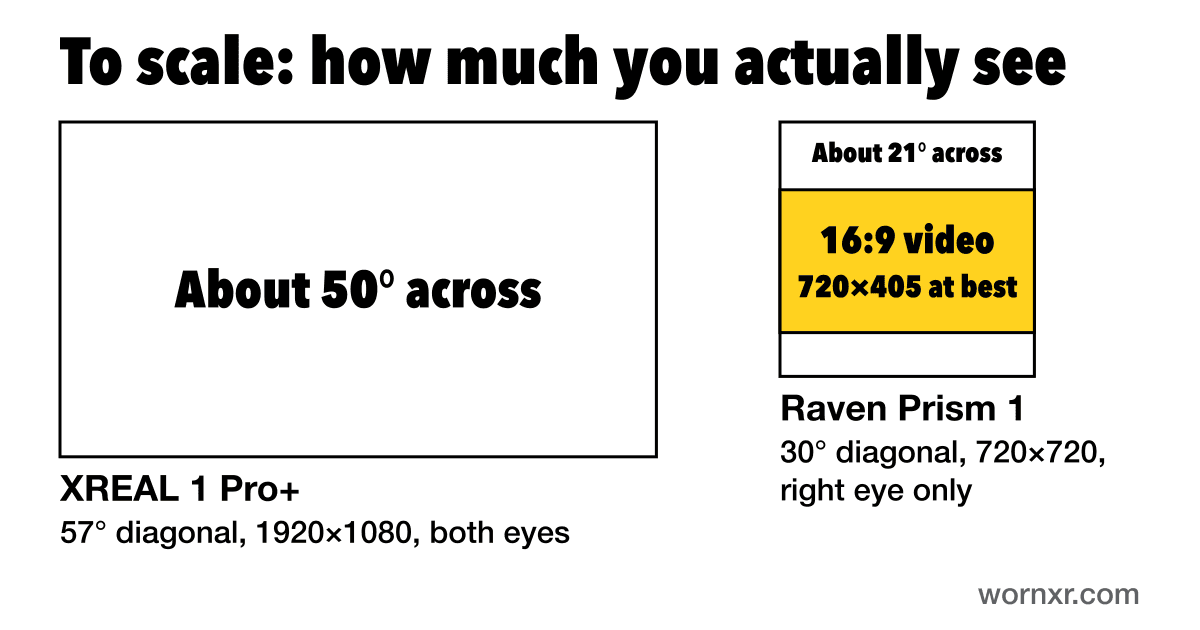
Sharpness isn't the problem. Divide the pixels across the diagonal by the diagonal angle, and the Prism gets about 34 pixels per degree. Those XREAL pairs get about 39. The same math gives Meta's Ray-Ban Display 42, which is the number UploadVR reports, so it's a fair yardstick. Text can look crisp. There's just not much room for it.
You can't plug anything into it
Here's the biggest difference for our readers. XREAL and VITURE glasses are monitors. Plug them into a Steam Deck, a laptop or a docked console, and you get a big screen.
Raven lists no video input on its product or developer pages. It lists Wi-Fi and Bluetooth. The only USB it mentions runs through the Wings battery mounts, for add-on modules.
So plan on no Steam Deck, no Switch 2 and no PS5 over a cable. It runs Linux, so someone could build a Wi-Fi streaming app, but that isn't plug and play. Raven's site says "Your desk, anywhere," without explaining how that works. The rest of its list points to quick looks: directions, recipes, grocery lists and boarding passes.
One eye isn't for everyone
The only outside look we've found is from The Ghost Howls, whose author saw a very early sample at AWE in June. It played a short video. "I hate monocular displays," the author wrote, and said they suit quick notifications better than real computing.
That's one person and one very early unit. Still, try a one-eye display before you commit if you can. Meta's Ray-Ban Display is right-eye only too.
How it stacks up
| Glasses | Price | Screen | Field of view | Runs on |
|---|---|---|---|---|
| Raven Prism 1 | $1,499 | 720×720 (right eye) | 30° | Its own Linux computer |
| Meta Ray-Ban Display | $799 | 600×600 (right eye) | 20° | Your phone and the Meta AI app |
| Snap Specs | $2,195 | Resolution not disclosed | 51° | Its own computer |
| XREAL Aura | $1,099 until 2027 | 1920×1200 (both eyes) | 70° | A pocket puck |
| XREAL 1 Pro+ | $599 | 1920×1080 (both eyes) | 57° | Whatever you plug it into |
Not all of these are in people's hands yet. Snap says Specs are due this fall, and the Aura ships from mid-November. New Prism reservations land in summer 2027.
What this means for you
You own XREAL or VITURE glasses. Keep them. The Prism does a different job.
You want a giant private screen. For flights, games or work, start with our best AR glasses for flights, AR glasses for Steam Deck or AR glasses for MacBook. Choosing between XREAL's newer pairs? See XREAL 1 Pro+ vs 1S.
You want a big screen and a computer in one. The XREAL Aura runs Android XR apps on its pocket puck. You get a bigger picture for less money, with a puck on a cable.
You want info at a glance, hands free. That's the Prism's real pitch. Meta's Ray-Ban Display does a version of it for $799, tied to your phone and Meta's app. Google and Samsung's versions are due in 2027 at the earliest. The Prism is the one to watch if you want a Linux computer you can get into and a strong privacy pitch.