Best AR glasses for work and coding, ranked by text sharpness
We ranked 17 pairs of AR glasses by how sharp text looks, from each maker's specs. Here are the best pairs for coding, spreadsheets and multiple screens.
For work, the pair to get is the one with the sharpest text, and that's not the priciest one. Cheaper glasses often look sharper, because they spread the same pixels over a smaller view. We worked out a sharpness score for 17 pairs from each maker's specs. Our pick for most people is the XREAL 1S.
Note
We haven't worked on these pairs ourselves yet. The sharpness scores are our own math from makers' specs, and prices are from each maker's US store, checked November 11, 2026.
Which AR glasses have the sharpest text?
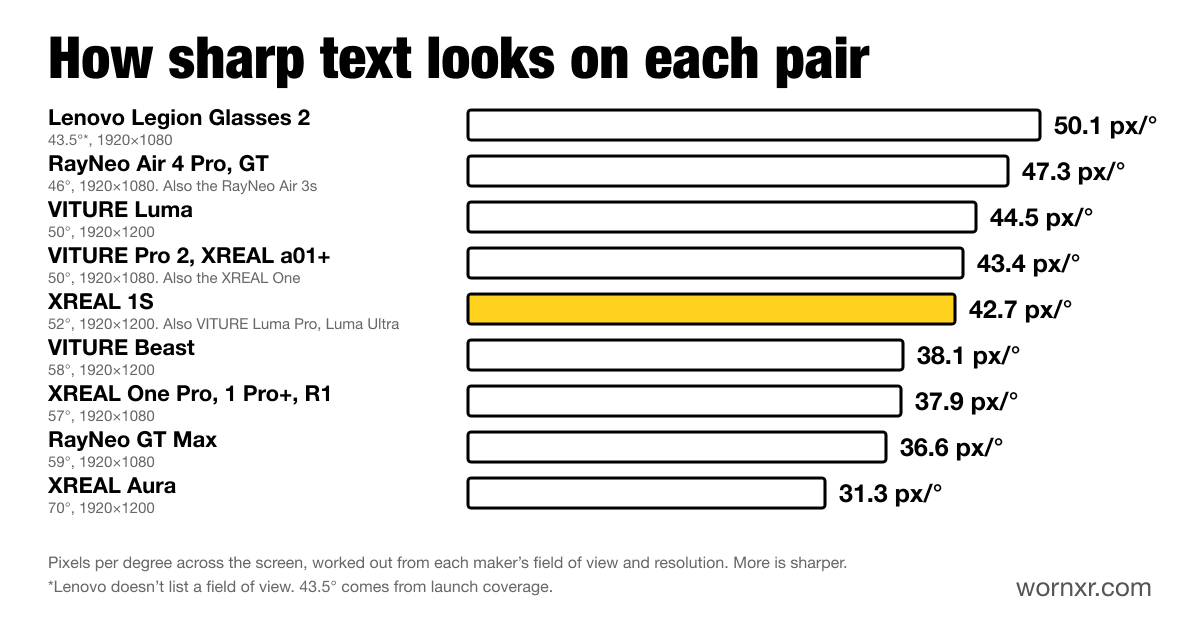
Our score is pixels per degree. It's how many pixels sit in each degree of your view, side to side. More pixels per degree means crisper letters at the same size.
| Sharpness | Pairs | Price | Rows of pixels |
|---|---|---|---|
| 50.1 | Lenovo Legion Glasses 2 | $249.99 | 1080 |
| 47.3 | RayNeo Air 3s, Air 4 Pro and GT | $269, $299 and $329 | 1080 |
| 44.5 | VITURE Luma | $399 | 1200 |
| 43.4 | VITURE Pro 2, XREAL xbx a01+ and XREAL One | $299, $299 and $399 | 1080 |
| 42.7 | XREAL 1S, VITURE Luma Pro and Luma Ultra | $449, $499 and $599 | 1200 |
| 38.1 | VITURE Beast | $549 | 1200 |
| 37.9 | XREAL One Pro, 1 Pro+ and ROG XREAL R1 | $599, $599 and $849 | 1080 |
| 36.6 | RayNeo GT Max | $429 | 1080 |
| 31.3 | XREAL Aura | $1,099 | 1200 |
How we worked it out: we took each maker's resolution and its field of view, measured corner to corner. From those, we found the view's width in degrees and divided the screen's width in pixels by it. Lenovo doesn't list a field of view, so its 43.5° comes from Notebookcheck's coverage.
Two things the score doesn't cover. It can't tell you how clear the lenses are toward the edges, and it doesn't count software sharpening. Treat it as a guide to the panel, not a review.
Why 1200 rows beat 1080
Look at the last column. The 1S, the whole Luma line, the Beast and the Aura have screens 1200 pixels tall. Most others are 1080. That's 11% more rows, so a code editor or spreadsheet shows about 11% more lines at the same font size.
The 1200-row pairs also use a 16:10 shape, the same as many laptops and handhelds.
Bigger screen or sharper text?
You can't have both on the same panel. A wider view makes the virtual screen look bigger, but each pixel covers more of your view, so text looks softer. That's why the $1,099 Aura, with the biggest picture here, comes last on sharpness.
For movies, bigger wins. For work, sharpness does. If you want both in one pair, the 1200-row pairs in the middle of the chart are the best compromise. Here are our picks for movies, ranked by screen size.
Our pick: XREAL 1S
The 1S gets a solid sharpness score of 42.7 and the taller 1200-row screens. It also has the best work features built in, at $449.
Its UltraWide mode runs on the glasses, with no app. You can pick 21:9 or 32:9 for a wide desk. You can also pick a tall 16:18 view, which is great for long files and web pages. The X1 chip pins the screen in place, so it stays put while you turn your head. On the One series, Text Optimization in the Display menu smooths jagged text, too.
It works with Macs, iPads and Windows laptops whose USB-C ports carry video. XREAL's prescription lenses cost $49.90 to $69.90 and cover astigmatism.
Skip it if you want two or three separate screens. UltraWide gives you one wide screen, so for separate windows, see the Luma Pro below.
Compatibility checkerMacBook Air (M5) + XREAL 1SWorksBest for multiple screens: VITURE Luma Pro
VITURE's free SpaceWalker app for Mac and Windows can float up to three screens side by side, or one ultrawide. The Luma Pro is the pair VITURE tunes it for. It has a built-in magnetometer to help cut drift, and SpaceWalker for Mac has a head tracking correction option for it. Screens you park around you for a workday stay where you left them. Our multiple monitors guide shows what works on Mac, Windows, Android and Linux.
It has the same 42.7 score and 1200-row screens as the 1S. It also has focus dials for nearsighted eyes, down to -4.00. It cost $499 when we checked.
Skip it if your laptop is short on power. VITURE's Windows requirements start at 16 GB of RAM and an Intel Core i7-13620H or equivalent. On a Windows laptop with a Snapdragon X chip, Extended mode needs a driver that means turning off security features. Our Windows ultrawide guide has the details.
Compatibility checkerMacBook Pro (M6 / M5 Pro / M5 Max) + VITURE Luma ProWorksBudget pick: RayNeo GT
At $329, the GT is one of the sharpest pairs here, at 47.3. It's also the cheapest pair we found with tracking on the glasses. Pin the screen and it stays put while you look around, with no app needed. At 68 g, it's light enough for long sessions, and Tom's Guide found text easy to read with no blurry edges.
One catch: RayNeo rates the GT at 336 nits in Pinned mode, so it's best indoors.
Skip it if your eyes are set much closer or wider than 64 mm. The GT comes in one fixed size, while the GT Max comes in three. Here's how the GT compares with the GT Max and Air 4 Pro.
Compatibility checkerMacBook Air (M5) + RayNeo GTWorksBest for a screen fixed in your room: VITURE Luma Ultra
Most pairs pin your screen with 3DoF. It stays put when you turn your head, but slides along if you lean in. The $599 Luma Ultra tracks with 6DoF in SpaceWalker, so the screen stays fixed in the room, like a real monitor. Lean in to read small text, and it gets bigger.
It has the same 1200-row screens and 42.7 score as the Luma Pro. VITURE rates it at up to 1,500 nits.
Skip it if you mostly work on the move. 6DoF matters most at a desk. Here's how it compares with the Beast.
Compatibility checkerMacBook Pro (M6 / M5 Pro / M5 Max) + VITURE Luma UltraWorksAlso good for work
- VITURE Luma, $399. Sharper than the Luma Pro at 44.5, with the same 1200-row screens, and its dials reach -6.00. It skips the Pro's magnetometer. Here's Luma vs Luma Pro.
- XREAL 1 Pro+, $599. It scores lower at 37.9, but it has a Reading mode tuned for text. Tom's Guide said it made text comfortable for long stretches.
- Lenovo Legion Glasses 2, $249.99. The sharpest score on paper, at 50.1. Lenovo doesn't list head tracking, though, so plan on a screen that moves with you.
- RayNeo Air 4 Pro, $299. Nearly as sharp as the GT, with no tracking.
Can AR glasses replace a monitor?
For a laptop on the go, they make a great second screen. For an all-day desk, not yet.
Here's the math, using the same pixels-per-degree score. A 24-inch 1080p monitor, viewed from 30 inches, works out to about 50. A 27-inch 1440p monitor works out to about 60. So the sharpest glasses match a basic office monitor. Most pairs sit between 38 and 47, and none reaches a 1440p desk screen.
Comfort is the other limit. XREAL recommends a 10-minute break for every 45 to 60 minutes of use. A monitor doesn't ask for that.
AR glasses vs a portable monitor
A portable monitor is simpler. There's nothing to fit, anyone nearby can look at it, and there's no weight on your face.
Glasses win when space or privacy matters. In a plane seat or a cramped café, they give you a big screen nobody else can read. The screen sits at eye level, so you're not hunched over a laptop. And they pack far smaller than a monitor.
If you'll work at the same desk every day, buy a monitor. If you work on trains, planes and couches, glasses make more sense.
Coding on AR glasses
Coding is mostly reading, so sharpness and rows matter more than screen size. A few tips:
- Bump the font size. Start a size or two above what you use on your laptop. Small text is the first thing to tire your eyes.
- Go tall. On XREAL's One series and 1 Pro+, the tall 16:18 UltraWide view fits a long file or a full terminal log.
- Split your screens. With SpaceWalker, keep your editor on one screen and your docs or app preview on another. SpaceWalker for Mac also has a Code Mode, which puts a tall screen on each side of a wide one.
- Keep the screen small. A smaller virtual screen keeps your whole editor in view without turning your head.
Using AI coding tools? Agents like Claude Code spend a session printing text for you to read and approve. That's long stretches of scrolling text and diffs. A sharp pair with 1200 rows, like the 1S or a Luma, keeps more of it on screen. Take the breaks, too.
More help
- Best AR glasses for MacBook, with the Mac setup steps
- Best AR glasses for PC, for Windows laptops and desktops
- Best AR glasses for iPad
- How to get an ultrawide screen on Windows
- AR glasses on Linux
- Cheapest AR glasses worth buying
- AR glasses field of view compared, and why a wider view isn't always sharper
How we picked
These picks come from makers' spec sheets, manuals and US stores, checked November 11, 2026, plus our own sharpness math. We haven't worked on them ourselves yet. When we do, this page gets our notes on text, comfort and eye strain. Here's how we research and test.