Best AR glasses for movies: biggest screens, HDR and 3D
We ranked AR glasses by how big the screen looks from 10 feet away. Here are the best pairs for movies, plus how HDR, 3D and streaming apps work on them.
The best AR glasses for movies give you a big, bright screen with deep blacks. Our pick is the XREAL 1 Pro+, which pairs a wide view with AI HDR and good sound. If you just want the biggest screen for the money, get the VITURE Beast. We ranked every pair by how big its screen looks from the same 10 feet, so you can compare them fairly.
Note
We haven't watched movies on these pairs ourselves yet. The screen sizes are our own math from makers' specs, and prices are from each maker's US store, checked November 11, 2026.
How big does each screen look?
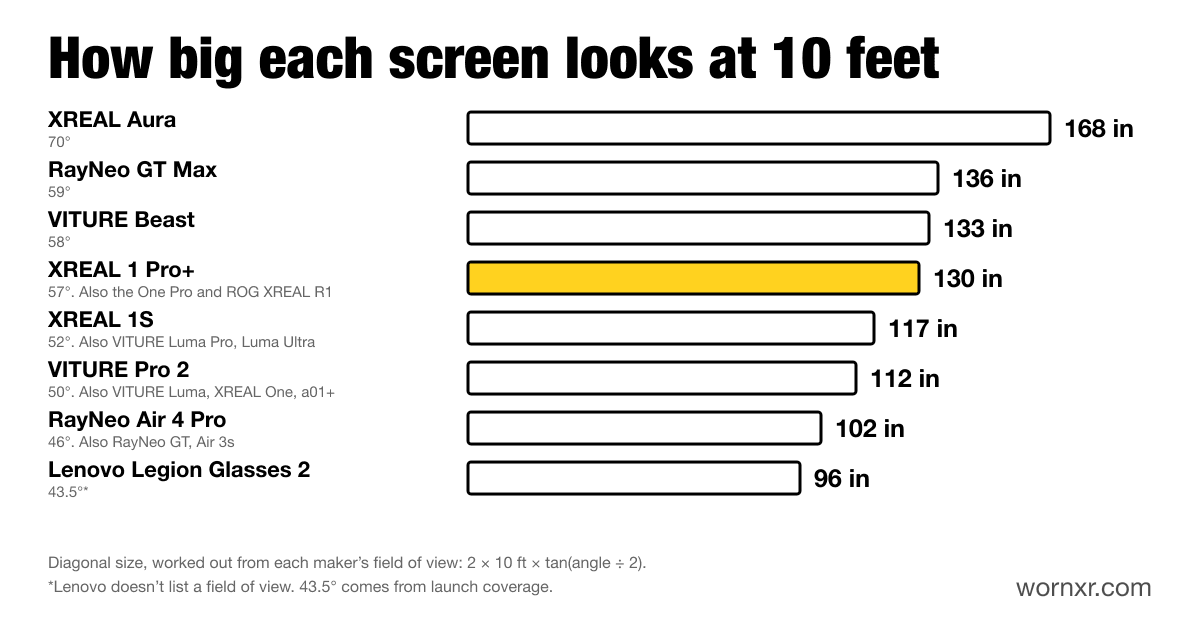
| Screen at 10 feet | Pairs | Price |
|---|---|---|
| 168 inches | XREAL Aura | $1,099 |
| 136 inches | RayNeo GT Max | $429 |
| 133 inches | VITURE Beast | $549 |
| 130 inches | XREAL 1 Pro+, One Pro and ROG XREAL R1 | $599, $599 and $849 |
| 117 inches | XREAL 1S, VITURE Luma Pro and Luma Ultra | $449, $499 and $599 |
| 112 inches | VITURE Pro 2 and Luma, XREAL One and xbx a01+ | $299, $399, $399 and $299 |
| 102 inches | RayNeo Air 3s, Air 4 Pro and GT | $269, $299 and $329 |
| 96 inches | Lenovo Legion Glasses 2 | $249.99 |
How we worked it out: we took each maker's field of view, measured corner to corner. Then we found the size of a TV that would fill the same view from 10 feet away, about where a couch sits from a TV. Lenovo doesn't list a field of view, so its 43.5° comes from Notebookcheck's coverage.
Why makers' screen sizes don't match
A virtual screen's size depends on how far away it seems, and makers pick their own distance. RayNeo quotes a 201-inch screen for the Air 4 Pro. VITURE quotes 174 inches for the Beast, and Lenovo quotes 126 inches for Legion Glasses 2.
On those numbers, the Air 4 Pro looks the biggest. It isn't. The Beast has the wider view, 58° against 46°. Field of view is the number to compare, and our chart puts every pair at the same distance.
One trade-off to know: a bigger screen spreads the same pixels wider, so text looks softer. That matters for work, not for films. Our work and coding picks rank the same pairs by sharpness.
Our pick: XREAL 1 Pro+
The 1 Pro+ has the best mix of size, brightness and movie features. Its 57° view works out to a 130-inch screen from 10 feet. XREAL rates it at up to 1,200 nits with AI HDR on, a setting that stretches brightness and detail in what you watch. It needs 60 Hz or 90 Hz input, which suits movies anyway. Tom's Guide found it made movies and shows look great.
It's built for watching in other ways too:
- A Movie mode. Standard, Movie and Reading presets tune the colors to what's on screen. XREAL's manual calls Movie "Cinema".
- 3D from any video. It turns 2D into 3D on the glasses, and XREAL rates the conversion at 60 fps.
- Three tint levels, to darken the room behind the picture.
- Bose-tuned speakers.
- Two frame sizes, for eyes 57 to 66 mm or 66 to 75 mm apart.
It cost $599 when we checked. XREAL's prescription lenses cost $49.90 to $69.90.
Skip it if you're on a tighter budget. The $449 XREAL 1S has the same tracking and turns 2D into 3D too, with a smaller 117-inch screen. Here's how the 1 Pro+ compares with the 1S.
Compatibility checkeriPad Pro (M5) + XREAL 1 Pro+WorksBiggest screen for the money: VITURE Beast
At $549, the Beast gives you a 133-inch screen from 10 feet, a touch bigger than the 1 Pro+. Its 1920×1200 screens are rated at up to 1,250 nits. It has nine levels of electrochromic tint, letting through anywhere from 40% down to 0.5% of outside light, so a bright room fades away. Sound is by HARMAN.
Its 3DoF chip is built into the glasses, so you can pin the screen in place on any device. VITURE's $79 prescription frame covers -16.00 to +12.00 for strong prescriptions.
Skip it if you want 3D in streaming apps. The Beast's 2D to 3D feature runs in VITURE's apps, and Tom's Guide notes it doesn't work inside the Netflix app. Here's how the Beast compares with the XREAL One Pro.
Compatibility checkerMacBook Air (M5) + VITURE The BeastWorksBiggest under $500: RayNeo GT Max
The GT Max has the widest view of any pair here except the Aura, at 59°. That's a 136-inch screen from 10 feet, for $429. It comes in three frame sizes, S, M and L, so the picture lines up with your eyes.
Its tracking chip gives you three modes. Pinned keeps the screen in place, Steady smooths out bumps on a train or plane, and Follow keeps it centered. For Dolby Vision, RayNeo sells the $199 Pocket TV Pro, a Google TV stick for its glasses.
Skip it if you watch in bright places. RayNeo rates the GT Max at up to 1,200 nits, but only 336 in Pinned mode. Our RayNeo lineup comparison has the full picture.
Compatibility checkeriPhone 17 Pro / 17 Pro Max + RayNeo GT MaxWorksBudget pick: RayNeo Air 4 Pro
At $299, the Air 4 Pro is the best value for watching. RayNeo calls it the first AR glasses with an HDR10 display, and it's rated at up to 1,200 nits. Android Authority saw HDR work from a MacBook, though not from a Pixel 9 Pro. Sound is tuned by Bang & Olufsen.
There's no head tracking, so the screen moves with you. On a couch, that's fine. RayNeo also sells it with its Pocket TV, a Google TV streaming box, for $379.
Skip it if you want the biggest picture. Its 46° view works out to 102 inches from 10 feet. The GT Max's works out to 136. Here's how the Air 4 Pro compares with the XREAL 1S.
Compatibility checkeriPhone 17 Pro / 17 Pro Max + RayNeo Air 4 ProWorksBiggest of all: XREAL Aura
The Aura's 70° view is the widest of any pair we cover. It works out to 168 inches from 10 feet. It's a different kind of device, though. It runs Android XR, Google's platform for glasses, from its own pocket computer, so it can play apps without your phone.
It starts at $1,099 until December 31, then $1,279. The first units ship in mid-November. Our XREAL Aura guide covers what works with it.
Skip it if you only want a screen for your phone or laptop. You'd pay $500 more than the 1 Pro+ for apps you might not use.
How 3D works on AR glasses
There are two kinds of 3D, and they work differently.
3D video files. These are films made in 3D, with a picture for each eye side by side, called SBS. Most display glasses have a 3D mode for them. On XREAL glasses, pick Full SBS or Half SBS to match the file. Our 3D movies guide has the button for every brand.
2D turned into 3D. Some glasses can add depth to any video:
- XREAL does it on the glasses. It's called REAL 3D on the One series and 1 Pro+, and Instant 3D on the ROG XREAL R1.
- VITURE calls it Immersive 3D. It runs in the SpaceWalker app or on the Pro Neckband.
- Lenovo lists a 2D/3D mode for Legion Glasses 2. Its 3D Mode update, announced in 2025, was for games launched from Legion Space on Windows 11.
Here's how the 2D to 3D options compare.
Want 3D films from a streaming service? Disney+, HBO Max, Peacock and Paramount+ are bringing 3D catalogs to Meta's VR Glasses, due in spring 2027. Here's how movies will work on them.
Netflix and other streaming apps
Streaming apps protect their videos, and that can leave the glasses black. XREAL says DRM and HDCP protection can block some content on external screens. Two traps catch Netflix fans:
- Your plan. Netflix says its ad-supported plan and Mobile plan don't let you watch on a TV from a phone or tablet. Error 10065, "The connected display is not supported," usually means this.
- Your adapter. If an adapter sits between your phone and the glasses, Netflix says it needs to support HDCP 2.2.
Our Netflix and streaming apps guide covers browsers, older iPhones and more.
Still black? Our black screen fix walks through the rest.
Tips for a better picture
- Darken the lenses. Tint makes blacks deeper and colors richer, especially in daylight.
- Shrink the screen if you're turning your head. A smaller screen keeps the whole picture in view.
- Watching in bed? Pick the right screen mode first. Here's how to watch lying down, brand by brand.
- Bring earbuds on a plane. Built-in speakers leak sound to the people next to you.
- Download before you fly. Our flight picks cover what works at 35,000 feet.
More help
- Glasses you can watch movies on, if you're new to all this
- Best AR glasses for flights
- Best AR glasses for gaming, if you'll play too
- Cheapest AR glasses worth buying
- Best AR glasses for iPad, a popular movie setup
- Best AR glasses for iPhone
- AR glasses field of view compared, with screen sizes at 2, 4 and 6 m
- Steam Frame vs AR glasses for movies, if you're tempted by VR
How we picked
These picks come from makers' spec sheets, manuals and US stores, checked November 11, 2026, plus our own screen-size math. We haven't watched on them ourselves yet. When we do, this page gets our notes on picture, sound and comfort. Here's how we research and test.
Sources
- tutorials.xreal.com
- tutorials.xreal.com
- tutorials.xreal.com
- tutorials.xreal.com
- tutorials.xreal.com
- tutorials.xreal.com
- tutorials.xreal.com
- us.shop.xreal.com
- xreal.com
- viture.com
- viture.com
- rayneo.com
- rayneo.com
- rayneo.com
- androidauthority.com
- tomsguide.com
- lenovo.com
- notebookcheck.net
- notebookcheck.net
- help.netflix.com
- help.netflix.com