Display glasses with no camera: which AR glasses have one?
Most AR display glasses have no camera, but a few VITURE and XREAL pairs do. Here's which ones, the best camera-free picks and why no camera isn't a free pass.
Most display glasses have no camera at all. That includes the RayNeo Air 4 Pro, VITURE's Luma and Pro 2, and every current XREAL pair except the Aura. The surprise runs the other way: VITURE's Beast, Luma Pro and Luma Ultra all have a camera built in. Want a big screen with nothing that can record? Our picks are below. Just know that "no camera" won't get you in everywhere. Some rules ban any smart glasses with a microphone or AI features.
Note
We haven't tested these pairs ourselves yet. The camera details come from each maker's spec sheets, help pages and developer docs, checked November 12, 2026. Where only a reseller lists something, we say so.
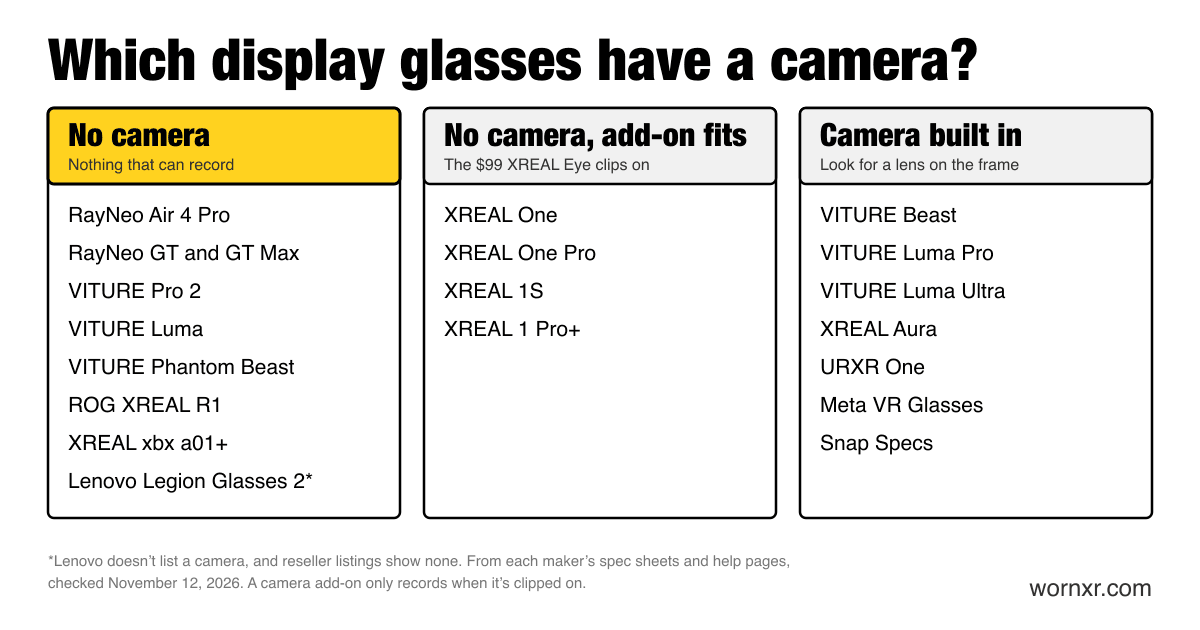
Which display glasses have a camera?
| Glasses | Camera? | The details |
|---|---|---|
| XREAL One, One Pro, 1S | No | The $99 XREAL Eye clips on to add one. XREAL lists it for the One and One Pro series and sells it with the 1S |
| XREAL 1 Pro+ | No | XREAL lists 6DoF "with the optional accessory," the Eye. It's $49 extra when you buy the glasses |
| ROG XREAL R1 | No | Motion sensors only |
| XREAL xbx a01+ | No | Motion sensor only |
| VITURE Pro 2 | No | VITURE's developer docs say "no RGB camera" |
| VITURE Luma | No | Same as the Pro 2: "no RGB camera" |
| VITURE Luma Pro | Yes, one | VITURE says it "has one camera in the middle." A privacy sticker comes in the box |
| VITURE Luma Ultra | Yes, three | One in the middle plus two depth sensors at the sides. Privacy sticker included |
| VITURE Beast | Yes, one | An RGB camera for mixed reality capture, with basic 6DoF coming in an update |
| VITURE Phantom Beast | No | VITURE says it "has no RGB camera" |
| RayNeo Air 4 Pro | No | Reviewers confirm there's no camera |
| RayNeo GT, GT Max | No | None in RayNeo's spec sheet |
| Lenovo Legion Glasses 2 | Probably not | Only resellers list it. They show two microphones and no camera |
| XREAL Aura | Yes, three | Two tracking cameras plus a "high-resolution camera with privacy LED indicator" |
| URXR One | Yes | Passthrough and tracking cameras. Its maker says you can only take screenshots |
| Meta VR Glasses | Yes | Color passthrough cameras, plus eye tracking |
| Snap Specs | Yes | Snap doesn't say how many. A light glows when you're recording |
The pattern is simple. A pair that only shows a screen doesn't need a camera. A pair that maps your room, tracks your hands or records video does. The Beast and the Luma Pro sit in between: mostly screens, with a camera added for capture and future tracking.
Our picks
Best big screen with no camera: VITURE Phantom Beast
The Phantom Beast is a collector's edition of the Beast, styled after the game Phantom Blade Zero. It has the same 58° view and 120Hz screen. The difference that matters here: VITURE says it "has no RGB camera," so it skips the Beast's mixed reality capture and its planned 6DoF tracking. It costs $599.
Skip it if you don't mind a camera. The regular Beast costs $549, so you pay $50 more to leave the camera out. Here's how the Beast compares with VITURE's other pairs.
Cheapest with no camera: RayNeo Air 4 Pro
At $299, the Air 4 Pro is the simplest pair on this list. It's a screen and speakers, with no camera and no head tracking, so the picture stays in the middle of your view.
Skip it if you want the screen to stay put while you look around. That needs head tracking, which the Air 4 Pro doesn't have. Our cheap AR glasses guide covers pairs that do.
Best with built-in focus dials: VITURE Luma
The $399 Luma has dials for nearsighted eyes, so many people can skip prescription lenses. VITURE's developer docs confirm it has no RGB camera.
Skip it if you mix up the names. The Luma Pro ($499) and Luma Ultra ($599) both have cameras. Check the exact model before you buy. Our Beast vs Luma Ultra comparison explains what those cameras do.
Compatibility checkeriPhone 17 + VITURE LumaWorksNo camera unless you add one: XREAL 1 Pro+
The $599 1 Pro+ has no camera of its own, and XREAL rates it at up to 1,200 nits, bright enough for a sunny window seat. If you ever want the screen pinned in the room with full 6DoF, you can clip on the XREAL Eye. Leave it in the box and there's no camera at all.
Skip it if you're on a budget. The $449 XREAL 1S also has no camera and takes the same Eye. Our XREAL buying guide compares every model.
No camera doesn't always get you in
Many places now ban smart glasses by what they can do, not just whether they have a camera. A few examples, checked November 12, 2026:
- The SAT. The College Board bans "smart glasses or any eyewear that provides access to the internet or to any AI feature or service."
- New York state courts. Since July 2026, they ban "smart glasses that contain a camera, microphone or computer." Display glasses have chips inside, so a rule worded like this could cover them too.
- Online exams with Pearson VUE. Its OnVUE rules ban "smart or connected devices with recording or AI features," and smart glasses are on the list.
- Royal Caribbean. You can bring smart glasses on board. But you can't use them in places like the casino, spa, restrooms and kids' areas.
- Hospitals. In November 2026, NT Health in Australia told its staff not to use recording-capable wearables at work.
So check the rules before you go, and pack a regular pair of glasses as backup. This isn't legal advice. If staff ask you to take them off, take them off.
What about HUD smart glasses?
HUD glasses are a different kind of product. They show text, directions and alerts in a small corner of your view, not a movie-sized screen. Some skip the camera on purpose. Here's how HUD, AI, AR and XR glasses differ.
| HUD glasses | Camera? |
|---|---|
| Even Realities G2 | No. Gizmodo reports no cameras or speakers |
| Halliday G2 | No. Pitched as camera-free for the office |
| Vuzix Z100 | No |
| RayNeo iO | No. It has four microphones instead |
| Brilliant Labs Halo | It has an optical sensor, which its maker says isn't for taking photos or videos. It feeds the AI assistant |
| Meta Ray-Ban Display | Yes, 12MP, with a recording light |
| Rokid Glasses | Yes, 12MP |
| RayNeo X3 Pro | Yes, 12MP, plus a spatial camera |
| INMO Air 3 | Yes, 16MP |
Weighing the two best-known HUD pairs? Here's Meta Ray-Ban Display vs Even G2, use by use. For every kind of display, from captions to movies, see smart glasses with a display.
Want the opposite, a camera and no screen? Samsung's first glasses work that way. Here's what we know about Samsung's glasses.
What about VR headsets?
Nearly every headset uses cameras to see the room. The Meta Quest 3, Samsung Galaxy XR, Apple Vision Pro and Valve's Steam Frame all do. The exceptions track with SteamVR base stations instead, like the Bigscreen Beyond 2e and the Lighthouse version of the Pimax Dream Air. Our Beyond 2e vs Dream Air vs Steam Frame comparison covers how each one tracks.
How to check any pair for a camera
- Look at the bridge between the lenses and at the outer corners. A camera shows up as a small round lens.
- Look for a light. Pairs that record usually have an LED that glows while the camera is on.
- Check the box. A privacy sticker in the box is a giveaway.
- Read the spec sheet for "RGB camera," "passthrough" or "6DoF." On glasses, 6DoF tracking usually means a camera, built in or added on.
More help
New to AR glasses? Start here for the five things to do first.
How we picked
We sorted every display pair we track by whether it has a camera, using each maker's own spec sheets, help pages and developer docs. Then we picked camera-free pairs for the most common needs: a big screen, a low price and built-in focus dials. Prices come from each maker's US store, checked November 12, 2026. We haven't tested these pairs ourselves yet. Here's how we research and test.
Sources
- viture.com
- viture.com
- viture.gorgias.help
- viture.com
- viture.com
- viture.com
- tutorials.xreal.com
- tutorials.xreal.com
- tutorials.xreal.com
- tutorials.xreal.com
- tutorials.xreal.com
- us.shop.xreal.com
- us.shop.xreal.com
- us.shop.xreal.com
- xreal.com
- virtual.reality.news
- rayneo.com
- ca.stockinthechannel.com
- unseen-reality.com
- roadtovr.com
- specs.com
- gizmodo.com
- androidheadlines.com
- vuzix.com
- idevice.com
- roadtovr.com
- notebookcheck.net
- rayneo.com
- gizmodo.com
- roadtovr.com
- satsuite.collegeboard.org
- nysba.org
- pearsonvue.com
- royalcaribbean.com
- abc.net.au
- meta.com