Which VITURE glasses should you get? Every model compared
VITURE sells five pairs, from $299 to $599. Here's every model in one chart, how its focus dials and tracking differ and which VITURE fits your eyes.
VITURE sells five pairs, from $299 to $599. Our pick for most people is the $549 Beast, because it pins your screen in place on any device. On a budget, get the $299 Pro 2. Two questions decide the rest: do you want focus dials, and where should the tracking run?
Note
We haven't tested VITURE's lineup ourselves yet. This guide uses VITURE's product pages, FAQs and US store, checked November 11, 2026.
Every VITURE pair at a glance
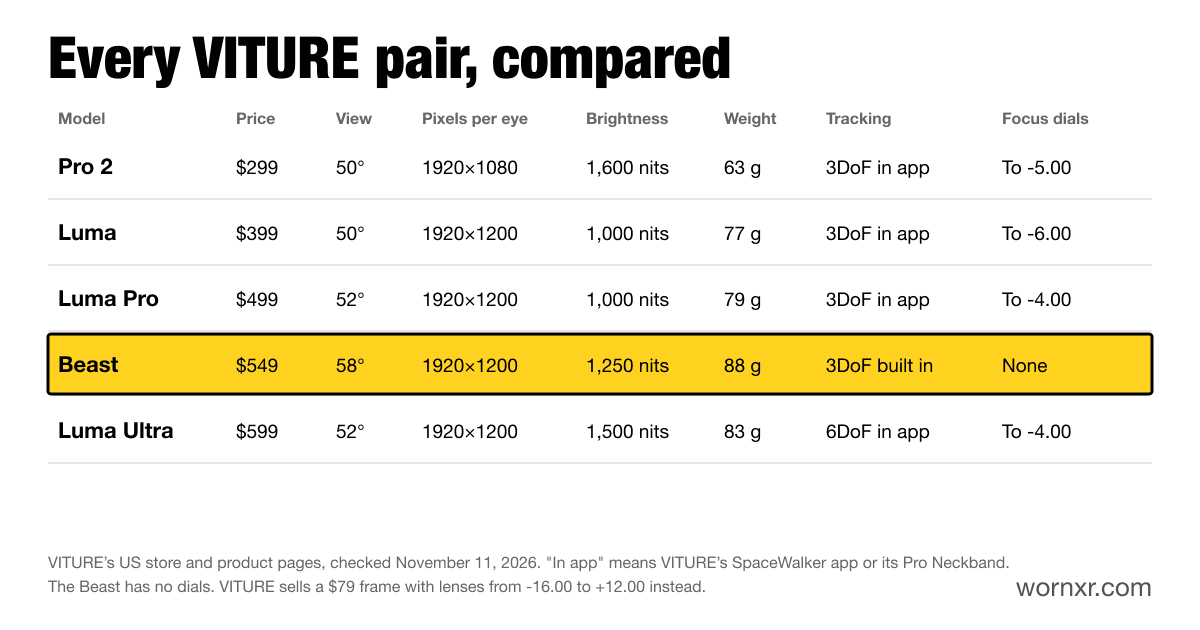
"In app" in the chart means the tracking runs in VITURE's SpaceWalker app or on its Pro Neckband, not on the glasses. The focus dial numbers are the strongest nearsighted prescription each one corrects.
The short version
- Most people: the Beast, $549. The biggest screen and the only VITURE that tracks on the glasses.
- The lowest price: the Pro 2, $299. Light, bright and with focus dials.
- Nearsighted, up to -6.00: the Luma, $399. The strongest dials in the lineup.
- Laptop work with several screens: the Luma Pro, $499. Steadier screens in SpaceWalker.
- Screens fixed in your room: the Luma Ultra, $599. 6DoF on a Mac or Windows PC.
Which VITURE for your setup?
| You want | Get | Why |
|---|---|---|
| Steam Deck, Legion Go or ROG Ally | Beast | It pins the screen with no app, on 16:10 screens |
| iPhone | Beast | The others need an $89 adapter or $99 dock to pin the screen |
| Switch 2 | Pro 2 with the Mobile Dock Mini | $378 together, $20 less than apart |
| Movies | Beast | A 58° view, 1,250 nits and nine tint levels |
| Nearsighted, no astigmatism | Luma | Its dials reach -6.00 |
| Astigmatism or a strong prescription | Beast | A $79 lens frame, from -16.00 to +12.00 |
| Mac or Windows work | Luma Pro | A magnetometer to help cut drift |
| A screen that stays put as you lean in | Luma Ultra | 6DoF in SpaceWalker |
| The lowest price | Pro 2 | $299, rated at 1,600 nits |
Focus dials or a lens frame?
Four of the five pairs have focus dials. Turn them and the picture sharpens for nearsighted eyes, with no lenses to buy. The Luma's reach -6.00, the Pro 2's reach -5.00, and the Luma Pro's and Luma Ultra's reach -4.00.
Dials only fix nearsightedness, though, not astigmatism. For that, you'll need lenses on any pair. VITURE sells a frame with lenses for the Pro 2 from $79.
The Beast has no dials at all. Instead, VITURE sells a $79 frame with lenses made to your prescription, from -16.00 to +12.00, with astigmatism. That makes it the VITURE for strong or complicated prescriptions. Here's how Beast lenses work.
Where does the tracking run?
This is the difference most buyers miss. Every VITURE can pin your screen in place, but only the Beast does it on the glasses. VITURE calls it VisionPair. Plug a Beast into a Steam Deck, a dock or an iPhone, and the screen stays put.
The Pro 2 and the Luma line pin screens in VITURE's SpaceWalker app instead. That works well on a Mac or Windows PC. But a Steam Deck or a console dock can't run the app, so there the screen moves with your head. On an iPhone, SpaceWalker's pinned screens need the $89 Charging Adapter Ultra or the $99 Mobile Dock Mini.
The Luma Ultra goes a step further, with 6DoF. Its cameras track where you are, not just where you look. That works in SpaceWalker on a Mac or Windows PC, or with VITURE's Pro Neckband, but not on phones or tablets.
Our pick: VITURE Beast
The Beast has VITURE's biggest view, at 58°. VITURE quotes a 174-inch screen. By our same-distance math, that's about 133 inches from 10 feet, still the biggest VITURE. Its 1920×1200 screens are rated at up to 1,250 nits, with nine levels of tint that let through anywhere from 40% down to 0.5% of outside light.
Its built-in tracking makes it the easiest VITURE to live with. It also does a 32:9 UltraWide view on its own. Sound is by HARMAN, and it comes in Regular and Large sizes. It cost $549 when we checked.
Skip it if you're nearsighted with no astigmatism and want to skip lenses. The Luma's dials might do the job. Here's how the Beast compares with the Luma Ultra.
Compatibility checkerSteam Deck OLED + VITURE The BeastWorksBudget pick: VITURE Pro 2
The Pro 2 launched in August 2026 and costs $299. VITURE rates it at up to 1,600 nits, the brightest in its lineup, and it weighs just 63 g. Its dials reach -5.00.
The savings show in two places. Its screens are 1080p, not 1200p. And its lenses have a fixed tint, with no dimming. For a Switch 2, VITURE sells it with the Mobile Dock Mini for $378. It's also the pair in the newest hands-on report of flying a DJI drone through glasses. Here's which DJI controllers work.
Skip it if you watch in bright places and want to darken the lenses. The Luma adds dimming for $100 more. Here's how the Pro 2 compares with the Luma Pro, and with the Beast.
Compatibility checkeriPhone 17 Pro / 17 Pro Max + VITURE Pro 2WorksBest for nearsighted eyes: VITURE Luma
The $399 Luma has the strongest dials VITURE makes, to -6.00. VITURE also says it has the largest eyebox in its lineup. In plain terms, it's the easiest to line up so the whole picture looks sharp.
It shares the Luma Pro's 1920×1200 screens and dimming. With a slightly narrower 50° view, its text looks a touch sharper too, by our math.
Skip it if you watch without earbuds. The Luma Pro adds HARMAN sound. Here's the Luma vs Luma Pro in full.
Compatibility checkerLegion Go 2 + VITURE LumaWorksBest for laptop work: VITURE Luma Pro
The $499 Luma Pro is the one VITURE tunes SpaceWalker around. It has a built-in magnetometer to help cut drift, and SpaceWalker for Mac has a head tracking correction option for it. If you park three screens around you for a workday, they stay where you left them.
It adds HARMAN sound and a slightly wider 52° view over the Luma. Its dials reach -4.00. It also has a camera in the middle of the frame, and VITURE puts a privacy sticker in the box.
Skip it if your prescription falls between -4.00 and -6.00. The cheaper Luma's dials cover you. Our work and coding picks compare it with XREAL's 1S.
Compatibility checkerMacBook Pro (M6 / M5 Pro / M5 Max) + VITURE Luma ProWorksBest for 6DoF: VITURE Luma Ultra
The $599 Luma Ultra has the same center camera as the Luma Pro and adds two depth cameras. With them, SpaceWalker can fix screens in your room. Lean in, step back or stand up, and they stay put. VITURE rates it at up to 1,500 nits.
Correction, November 12, 2026
We first said the Luma Ultra adds a color camera. The Luma Pro already has one, in the middle of the frame. What the Ultra adds is the two depth cameras.
The cameras need the right partner, though. 6DoF works in SpaceWalker on a Mac or Windows PC, or with the Pro Neckband, VITURE's wearable Android computer. Hand gestures need the Pro Neckband. It comes in one size, Regular.
Skip it if you'll mostly use a phone or handheld. Its cameras would sit idle, and the Beast costs $50 less. Here's the Luma Pro vs Luma Ultra in full.
Compatibility checkerMacBook Pro (M6 / M5 Pro / M5 Max) + VITURE Luma UltraWorksWhat about the Phantom Beast?
VITURE also sells a $599 Phantom Beast, which it calls a wearable collector's edition. It's inspired by the game Phantom Blade Zero, with a matching design and collector's extras. VITURE lists the same 174-inch screen as the Beast. The real difference is the camera. VITURE says the Phantom Beast "has no RGB camera," so it skips the Beast's mixed reality capture and its planned 6DoF tracking. So the extra $50 buys the look, minus the camera. Want no camera at all? Here are display glasses with no camera.
Correction, November 12, 2026
We first said the Phantom Beast only differs from the Beast in looks. VITURE's Beast guide says it has no RGB camera, so it also lacks mixed reality capture and the Beast's planned 6DoF.
Docks and add-ons
- Pro Mobile Dock, $99. For a Switch, Switch 2, PS5 or Xbox, with two glasses ports. VITURE says it works with XREAL and RayNeo glasses too. With a Beast, it now supports 120Hz in 2D and side-by-side 3D, from Beast firmware 0.01.026_20260716, but not UltraWide. Trouble on a Switch 2? Here's our Beast and Switch 2 fix.
- Mobile Dock Mini, $99. A smaller Switch dock with a battery that detaches.
- HDMI to USB-C cable, $29. For a PS5 or Xbox.
- Charging Adapter Ultra, $89. Charges your phone while you watch, and unlocks pinned screens on an iPhone.
Correction, November 12, 2026
We first said the Pro Mobile Dock doesn't support 120Hz or 3D mode with a Beast. VITURE's dock guide now lists both, once the Beast runs firmware 0.01.026_20260716 or newer. UltraWide is still unsupported.
Our Beast accessories guide covers firmware and limits for each, and our Switch 2 hub has the setups that work.
Specs side by side
| Spec | VITURE Pro 2 | VITURE Luma | VITURE Luma Pro | VITURE The Beast | VITURE Luma Ultra |
|---|---|---|---|---|---|
| Display | Sony Micro-OLED, BirdBath opticssrc | Sony Micro-OLEDsrc | Sony Micro-OLEDsrc | Sony Micro-OLEDsrc | Not listed |
| Resolution per eye | 1920×1080src | 1920×1200src | 1920×1200src | 1920×1200src | 1920×1200src |
| Field of view | 50°src | 50°src | 52°src | 58°src | 52°src |
| Refresh rate | 120 Hzsrc | 120 Hzsrc | 120 Hzsrc | 60 / 120 Hzsrc | 120 Hzsrc |
| Brightness | 1600 nitssrc | 1000 nitssrc | 1000 nitssrc | 1250 nitssrc | 1500 nitssrc |
| Weight | 63 gsrc | 77 gsrc | 79 gsrc | 88 gsrc | 83 gsrc |
| Tracking | 3dofsrc | 3dofsrc | 3dofsrc | 3dofsrc | 6dofsrc |
| Dimming | Not listed | Electrochromic filmsrc | Electrochromic filmsrc | 9-level electrochromic tintsrc | Electrochromic film, 0.5-40% transmittancesrc |
| Audio | AAC Systemsrc | AAC Systemsrc | HARMAN AudioEFXsrc | HARMAN AudioEFXsrc | HARMAN AudioEFXsrc |
More help
- XREAL vs VITURE vs RayNeo, how the brands differ
- XREAL One Pro vs VITURE Beast
- Which XREAL glasses should you buy?
- AR glasses for glasses wearers
- VITURE SpaceWalker on every platform
- VITURE firmware updates, how to update and what changed
- Cheapest AR glasses worth buying
- Try VITURE glasses at Best Buy, and where else to try a pair
How we picked
Each pick matches a VITURE pair to the job it suits, based on VITURE's specs, FAQs and US prices from November 11, 2026. We haven't worn any of them yet. Once we have, this guide gets our notes on fit and picture. Here's how we research and test.